Pathao + WooCommerce for Bangladesh COD stores
Pathao is one of the most-used couriers for Facebook and WooCommerce COD sellers in Bangladesh.
The bottleneck is rarely “which courier”—it is copy-pasting name, phone, address, and COD amount into the Pathao merchant panel after every confirmation.
Typos create wrong deliveries, failed attempts, and return fees that wipe thin margins.
This Pathao courier guide shows how to connect Pathao’s merchant/developer API to WooEasyLife, map your store/warehouse, book parcels from WooCommerce (single or bulk), save tracking IDs on the order, and sync status updates—without leaving your dashboard.
Pair it with BD Fraud Checker and Fake Order Protection so risky numbers are filtered before auto-booking.
Bangla version: Pathao courier guide. Full ops context lives in the hub: English WooCommerce guide. Day-to-day confirm → book flow: Courier Auto Entry.
Why Pathao API integration beats manual booking
Manual Pathao booking fails at volume: staff open the order, copy fields, switch tabs, paste into Pathao, then paste the consignment ID back into notes.
At 40–100 COD orders per day that loop burns hours and still produces wrong zones, missing COD amounts, and duplicate entries.
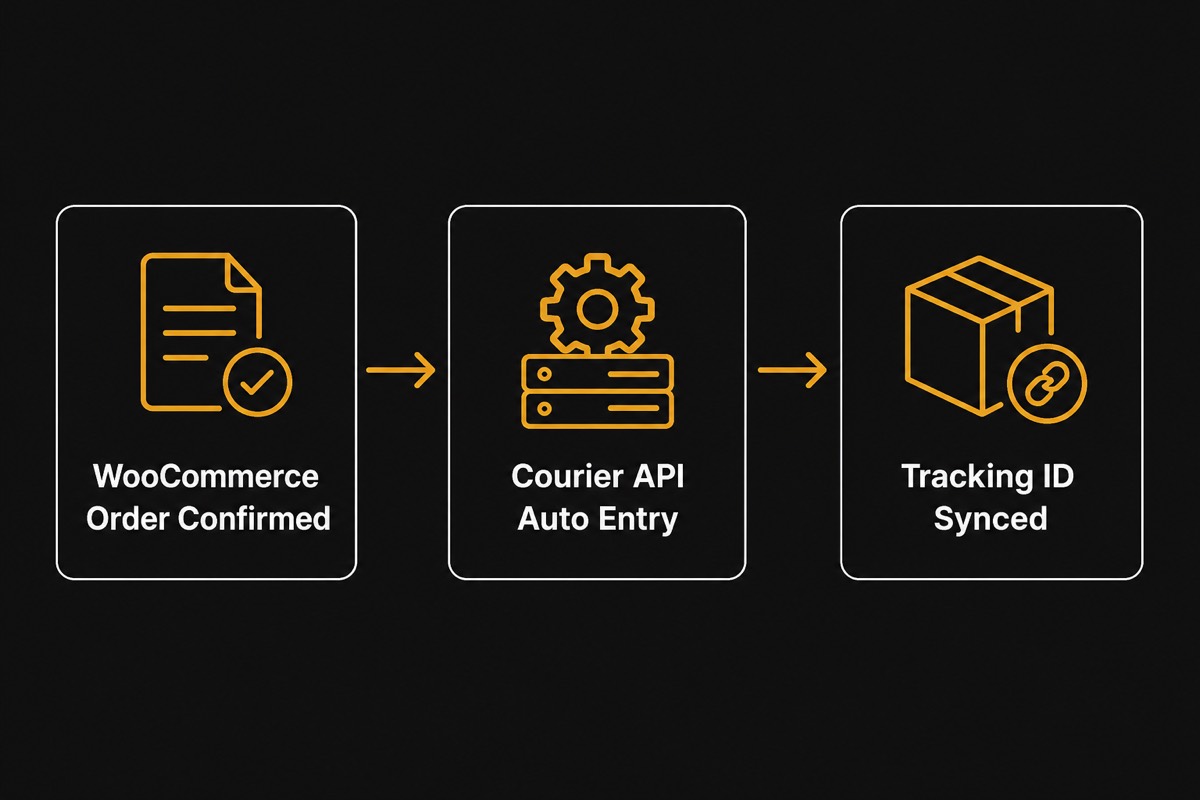
With API integration, WooEasyLife sends structured order data to Pathao after you confirm. Pathao returns a consignment/tracking ID that is stored on the order.
Labels can be printed from your workflow, and status changes can flow back for notifications. Typical wins: ~90% less booking time, fewer address typos, and cleaner COD reconciliation later.
Compare delivery costs before you scale a city mix with Courier Charge Calculator.
If returns already hurt profit, measure monthly loss with Return Loss Calculator first—then automate Pathao only for verified orders.
Pathao credentials: Client ID, Secret, username, password
Pathao uses developer/merchant API credentials—not a single static “API key” like some couriers. From the Pathao merchant/developer panel, collect: Client ID, Client Secret, Username, and Password. Keep these private;
rotate them if a staff account leaves or a key leaks.
In WooEasyLife open Courier Settings → Pathao, paste the four values, enable Pathao, and run a connection test. Then set your default store/warehouse location so parcels inherit the correct pickup context.
Wrong store mapping is a common cause of booking errors even when credentials are valid.
After a green connection test, book a single low-risk test order end-to-end before enabling bulk. Confirm in Pathao that the parcel appears with the expected COD amount and area.
Only then turn on routine auto entry via Courier Auto Entry.
Step-by-step: connect Pathao to WooCommerce
1) Create or open your Pathao merchant account and enable Developer/API access. 2) Copy Client ID, Client Secret, Username, and Password. 3) In WooEasyLife → Courier Settings, enable Pathao and paste credentials.
4) Select default store/warehouse and save. 5) Run connection test. 6) Confirm a test WooCommerce order, send to Pathao, verify tracking ID saves.
7) Optionally enable SMS/WhatsApp tracking templates on Notifications automation.
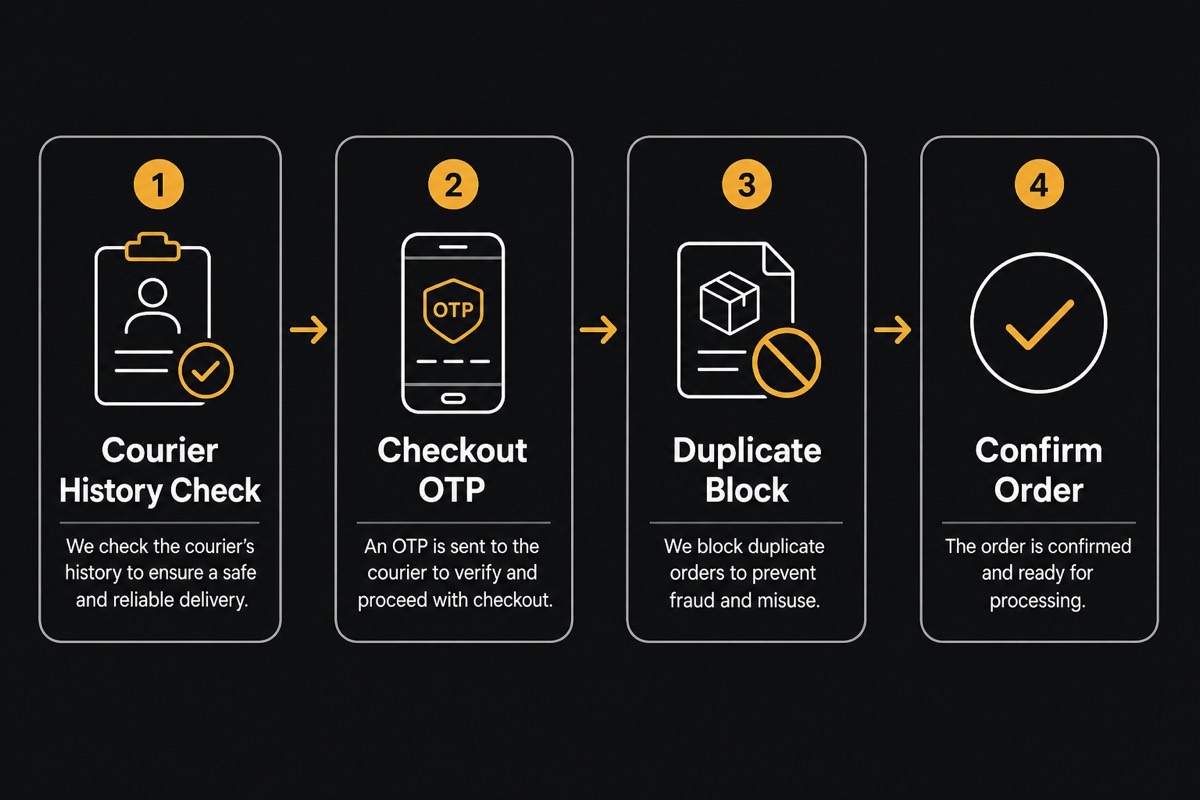
Recommended safety order: free number check on BD Fraud Checker → checkout OTP Bangla home duplicate rules on Fake Order Protection → Pathao booking on confirm.
Auto-shipping every order without fraud filters turns Pathao automation into an expensive return machine.
For multi-courier shops, keep Pathao next to Steadfast and RedX guides: Steadfast integration and RedX courier guide. Use one primary courier per zone when possible so staff do not guess which panel to open.
Confirm → Pathao auto entry workflow
Ideal loop: Order arrives → fraud/history check → call or OTP if yellow/red zone → mark confirmed → WooEasyLife pushes name, phone, address, item notes, and COD amount to Pathao → consignment/tracking ID returns → packing label → rider pickup.
No Excel upload and no second tab for typing.
Bulk mode: from the WooCommerce orders list, select dozens of confirmed orders and send to Pathao in one action. Use bulk only after single-order booking is stable.
Review failed rows (invalid area, missing phone, COD mismatch) before retrying so you do not create duplicate consignments.
Mobile ops: approve or hold from the road with WooEasyLife mobile app, then let Pathao booking run after confirm. Incomplete checkout recovery and tracking alerts still belong in Notifications automation.
City, zone, area mapping and COD amounts
Pathao booking quality depends on address structure. Map WooCommerce city/zone/area fields (or your custom checkout fields) to Pathao’s location IDs.
Vague addresses like “near mosque, Mirpur” without zone/area often fail API validation or land in the wrong hub.
COD amount must match what the rider should collect—including delivery charge rules you promised the customer. Mismatched COD creates delivery disputes and reconciliation headaches.
Keep product prices and shipping lines consistent before confirm.
Weight and product notes help Pathao and your packers. If you ship mixed SKUs, put a short packing note on the order so the label and Pathao entry stay aligned. Charge planning: Courier Charge Calculator.
Tracking IDs, status sync, and customer messages
After booking, store Pathao’s tracking/consignment ID on the WooCommerce order. Customers ask “where is my parcel?” less when you send In Transit and Out for Delivery messages automatically.
Out-for-delivery alerts especially reduce “customer unavailable” returns because cash is ready and unknown rider calls are expected.
Wire templates in Notifications automation (WhatsApp primary, SMS fallback). Keep short, branded copy with order ID, COD amount, and tracking link.
Optional: a branded track page on your domain so customers stay on your site instead of a generic courier page.
When Pathao marks return/cancel, update stock and flag RTS in your ops view. Combine with COD return reduction playbooks so returns become a measured process—not surprise losses at month end.
Fraud check before you auto-book Pathao
Pathao automation is powerful after confirmation—not a replacement for verification. Check courier success rate by mobile on BD Fraud Checker. Green-zone history can confirm fast; yellow needs call/OTP;
red often needs advance fee or hold via Customer verification and Fake Order Protection.
Worked mindset: shipping 10 high-risk COD parcels “because Pathao is connected” can erase the profit from many successful deliveries through reverse fees, packaging, and ad CPA. Automate booking for clean orders;
slow down for risky ones.
Full COD math and multi-layer protection live in English WooCommerce guide. Measure return money with Return Loss Calculator before you increase ad spend.
Troubleshooting Pathao API bookings
Connection test fails: re-copy Client ID/Secret/username/password, check merchant API access is enabled, and confirm no extra spaces. Auth errors after a password change require updating WooEasyLife settings immediately.
Booking fails on area/city: fix checkout mapping or ask the customer for a clearer address before retry. Duplicate consignments: do not spam “send to Pathao” on the same order—check whether a tracking ID already exists.
COD mismatch: reconcile cart totals and shipping lines, then rebook once.
Still stuck? Compare with Steadfast setup patterns on Steadfast integration or RedX on RedX courier guide. Ops overview remains Courier Auto Entry.
Start a trial from Pricing when you are ready to run Pathao in production.
Next steps and related Pathao resources
Checklist: Pathao credentials saved → connection test green → store mapped → one test parcel OK → fraud layers on → notifications on → bulk enabled for confirmed orders only.
Keep reading: Courier Auto Entry for daily workflow, Notifications automation for tracking SMS/WhatsApp, COD return reduction for RTS control, and English WooCommerce guide for the full 30-part system.
Bangla mirror: Pathao courier guide.