Quick answer
When a rider sends a SteadFast cancel or return request, it also lands in WooEasyLife under Courier → Return Requests.
Open Decide, call if needed, keep a call log, then Confirm cancel or Ask to resend—without Change Status on every portal row.
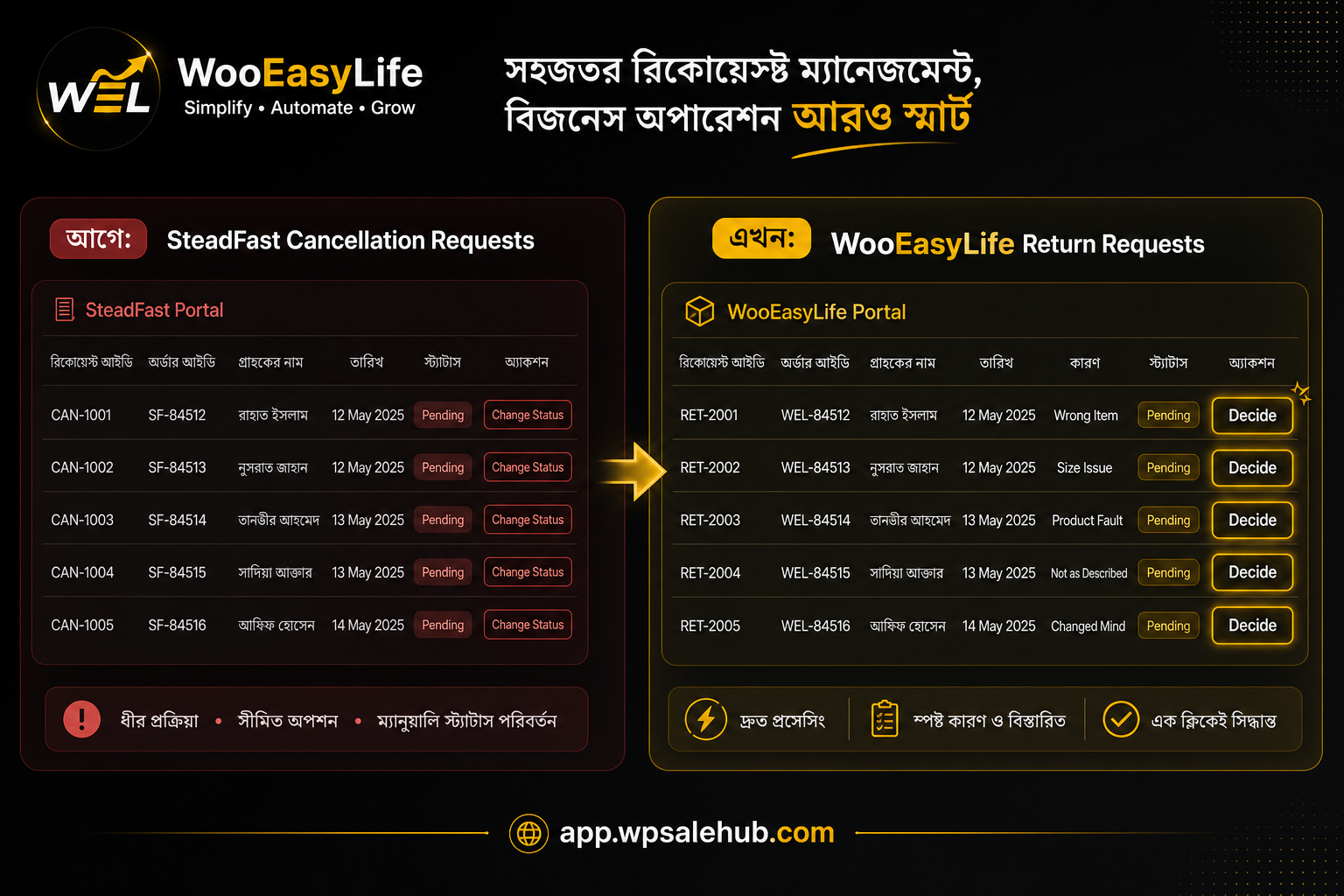
What made the workday annoying
Booking a COD parcel is not the end of the job. Riders leave notes—customer not answering, address unclear, or they will not take the parcel. Cancellation Requests fills up. Pending, Change Status, repeat.
A few dozen a day and the team burns hours in the portal.
Picture a morning with eight Pending items: will not take the parcel, phone never answered, cannot find the address. Each needs a click, then you hunt the order back in WooCommerce.
That friction is what the Return Hub shrinks.
Booking plugins matter. But leaving cancel requests only on the portal still burns return fees and staff time. This hub is the after-booking layer.
A real walkthrough—from note to decision
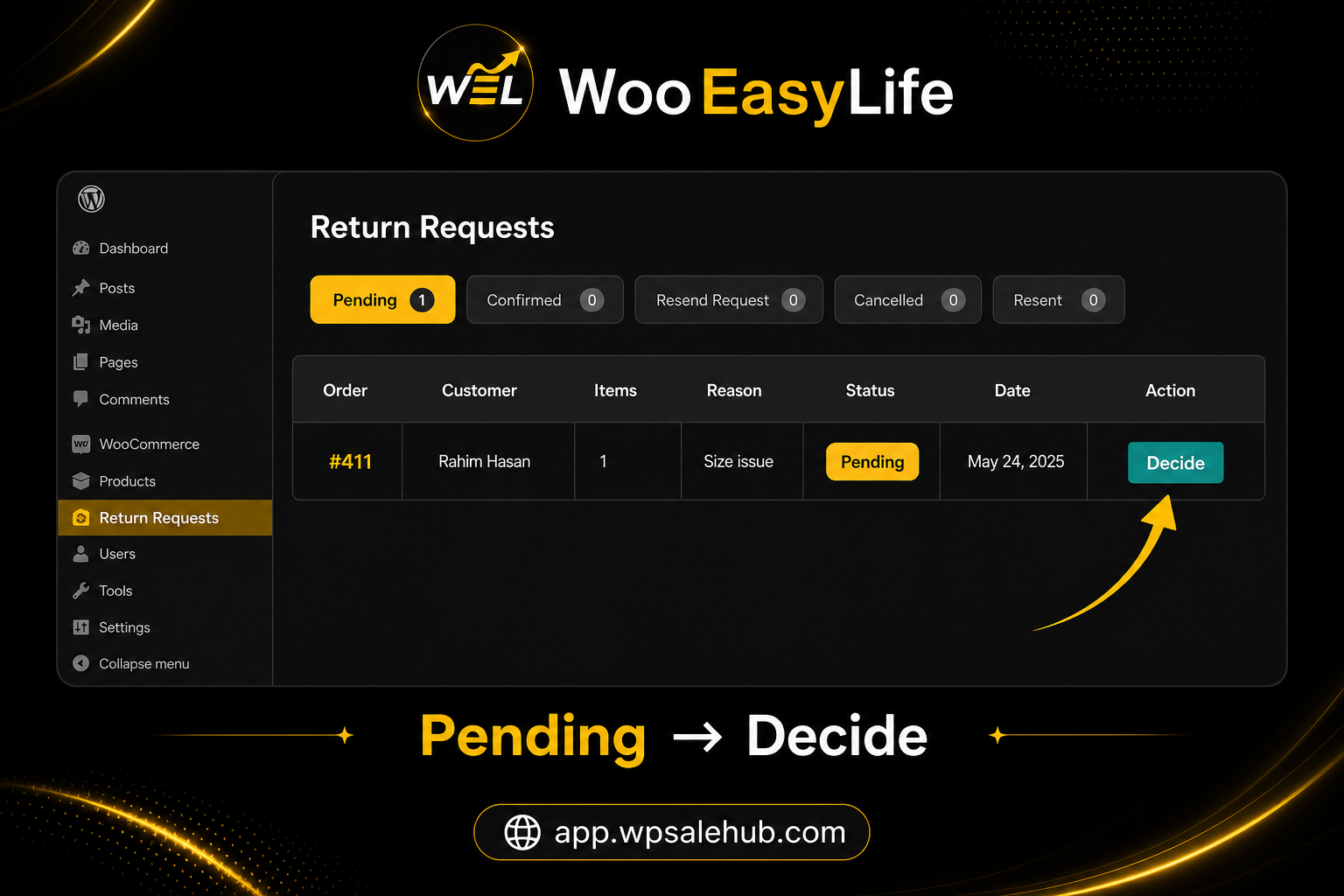
Say order #411. Rider note: customer will not take the parcel, merchant aware. On the portal you would hit Change Status. Now open Return Requests → Pending → Decide—same note in History.
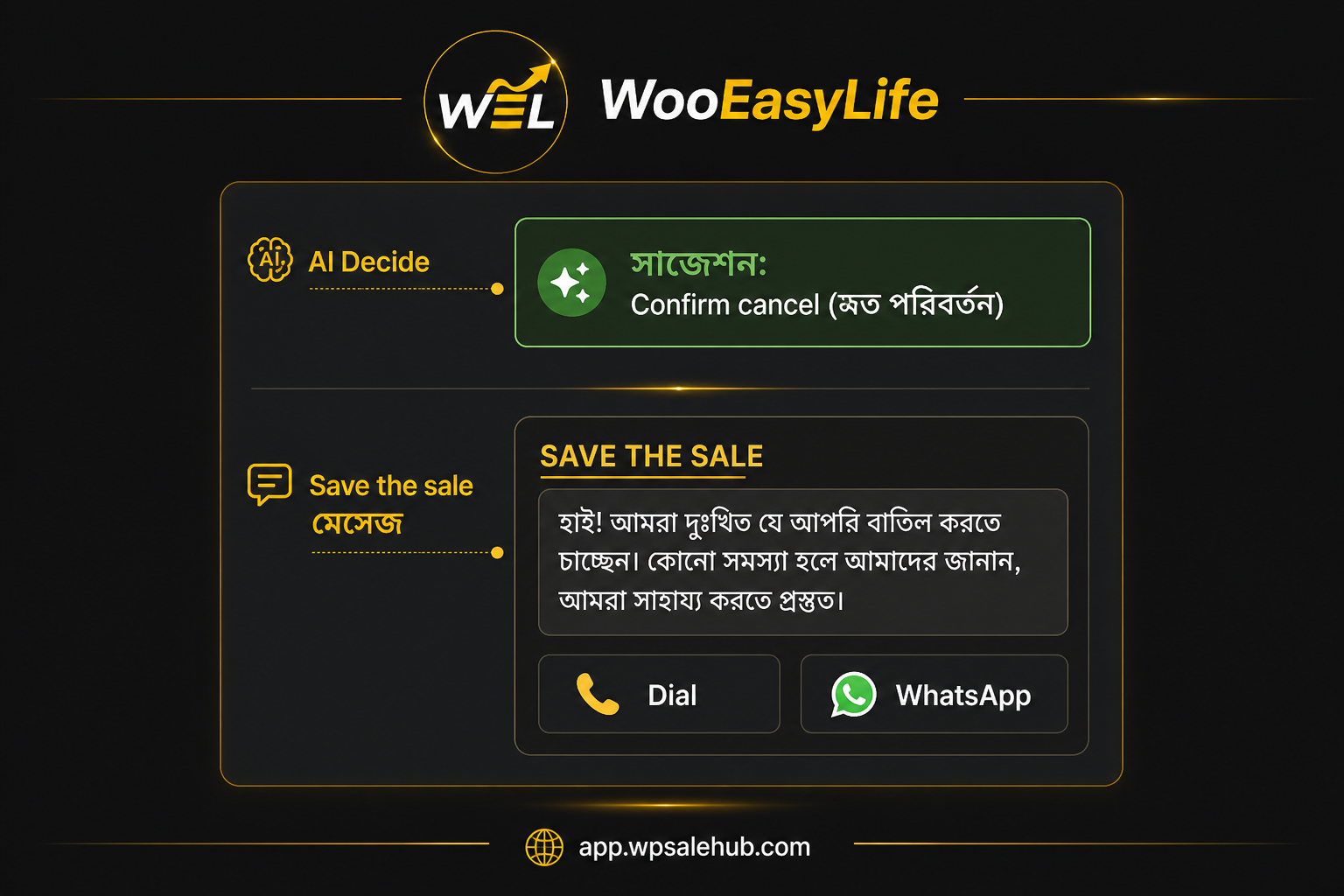
Optionally Call the rider first—true refuse, or just a missed phone? The call log stays on the order. Want one more chance with the customer? Use Save the sale to Dial or WhatsApp.
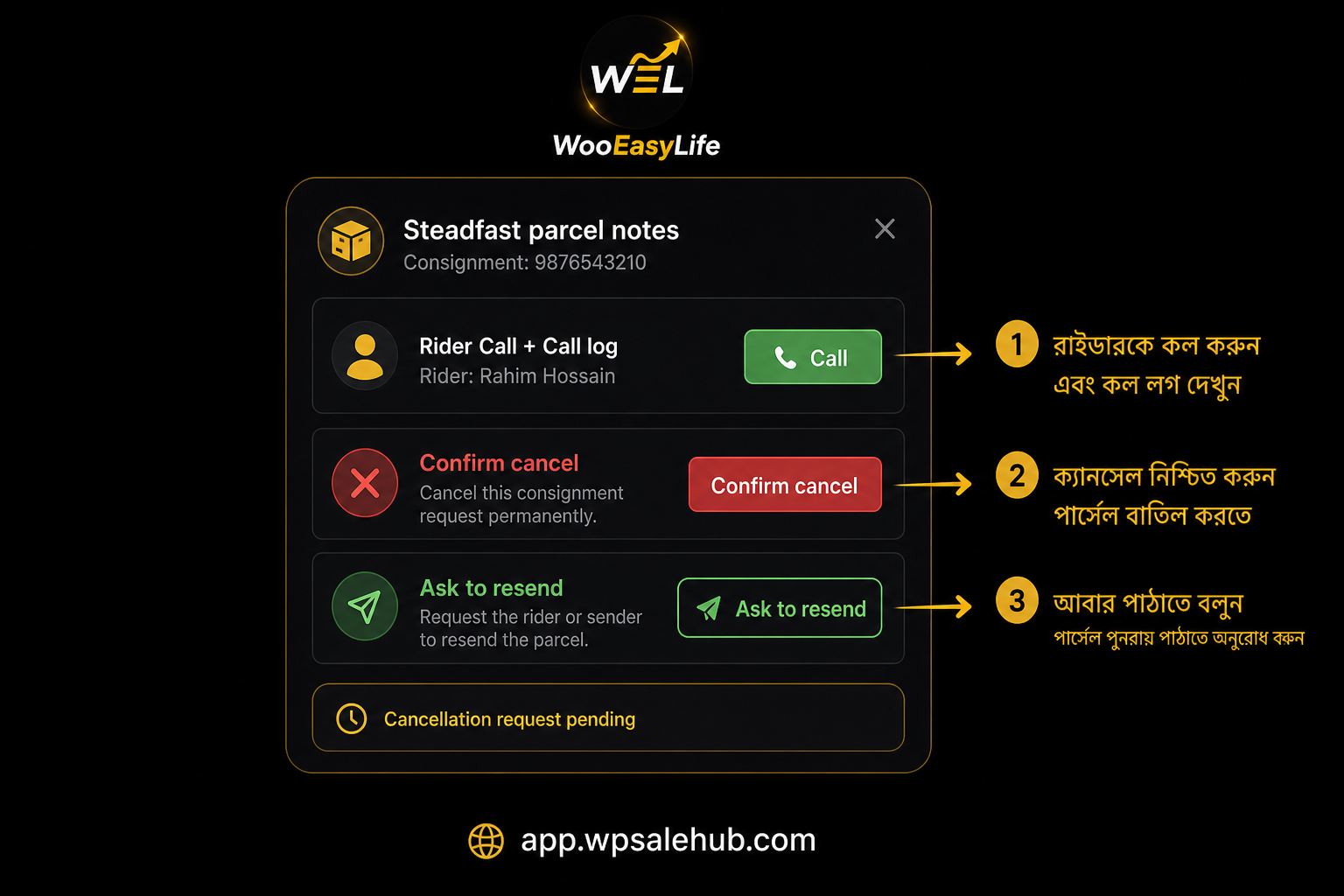
When it is clear, Confirm cancel. If it looks like address or timing, Ask to resend. If AI suggests changed mind, still read the note and decide yourself. Ten cases a day stop feeling like a portal marathon.
What you see inside the plugin
Return Requests mirrors familiar tabs: Pending, Confirmed, Resend Request, Cancelled, Resent—plus date filter, Refresh, and CSV. Tap Decide on Pending to open Steadfast parcel notes.
Pending means a decision is still owed. Confirmed locks cancel or return. Resend Request means you asked the courier to try again. Cancelled and Resent are history.
Tell new staff: Change Status on the portal becomes Decide here.
The modal keeps consignment, order link, History, Details, and Edit parcel together. Confirm cancel and Ask to resend sit up front when a cancellation is pending.
Call the assigned rider and keep the call log—order context on one screen.
How to run the day
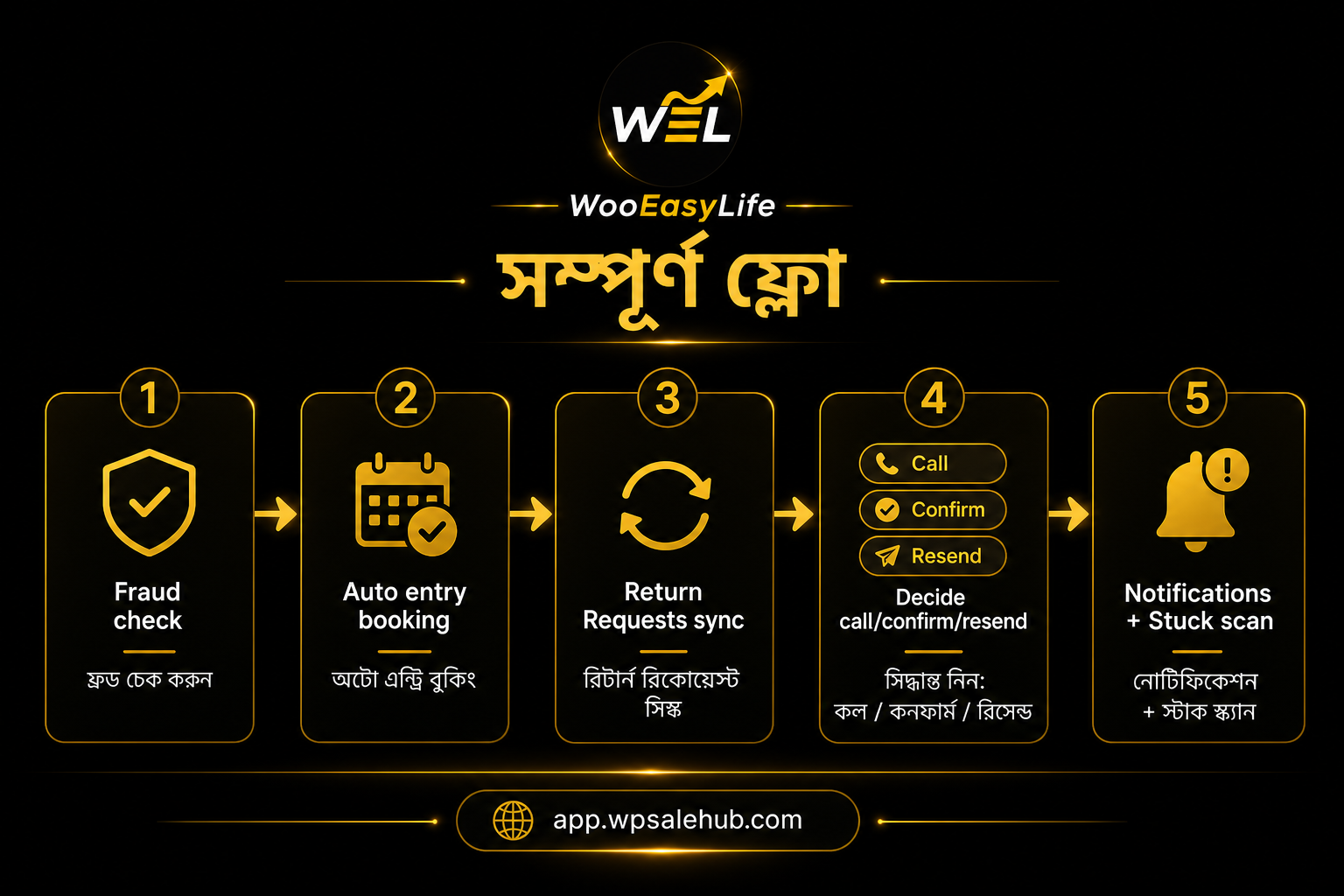
Connect the API with Steadfast integration and keep Courier Auto Entry on. Then Courier → Return Requests → Refresh.
Pending → Decide → read the note → call the rider if needed → Dial/WhatsApp the customer if worth saving → Confirm cancel or Ask to resend. Use Notifications and Scan stuck for parcels quiet about three days.
For the first few days, tell the team: new cancel request? Check plugin Pending first. Once the habit sticks, portal opens drop.
- Connect API and keep auto-entry on
- Sync Return Requests → open Pending
- Decide → notes → call if needed
- Confirm cancel or Ask to resend
- Follow up with Notifications Bangla home stuck scan
Why rider call and call log matter
Not every cancel request means the sale is dead. Confirming cancel without a quick call can kill a recoverable order.
The modal keeps the rider number ready. Call, compare with the note, and leave a trail so the next teammate knows who already called. Small teams feel the duplicate-call tax most.
AI suggestion and Save the sale (optional)
With an AI package, the modal may suggest Confirm cancel or Ask to resend—for example changed mind or unreachable. It is guidance; you still click.
Save the sale drafts what to tell the customer by Dial or WhatsApp. Many staff know how to Confirm but freeze on what to write—this fills that gap.
Human buttons still work without AI. Ignore a bad suggestion. We do not claim a Meta AI Bot or free full AI on every plan.
Notifications, stuck, and how this differs from auto-entry
Notifications gathers portal updates and cancel signals. Scan stuck finds parcels quiet about three days so you follow up sooner. Stuck does not always mean cancel.
Courier Auto Entry creates the parcel after confirm. This hub handles after-booking Decide, calls, and stuck. Auto-entry puts the parcel on the road; the Return Hub decides when the road gets messy. You need both.
Who it helps—and what we do not claim
SteadFast-heavy COD stores, small teams, and agencies clearing Cancellation Requests daily. Pathao/RedX-heavy? This Return Hub is SteadFast-centric today; their booking still goes through Courier Auto Entry.
We do not claim every SteadFast portal tool (Add Fund, Bulk Print, and so on)—only the cancel/return Decide workflow. Deep setup stays on Steadfast integration. Trial: Pricing.
Mistakes to skip
Ignoring plugin Pending while living in the portal. Confirming cancel without reading notes. Skipping call logs. Treating AI as mandatory.
Also: blind-booking risky numbers and flooding the cancel queue. Check history on BD Fraud Checker or Fake Customer Check first; keep Fake Order Protection on for repeats.
Review monthly loss on Return Loss Calculator.
Getting-started checklist
Pricing → Steadfast integration → keep Courier Auto Entry on → practice Decide on one Pending item. Try Save the sale if you have AI—Confirm/Resend still work without it.
One line: when a cancel request arrives, see it in the plugin, call if needed, then Confirm cancel or Ask to resend—without Change Status on every item. Bangla: Bangla Return Hub (app.wpsalehub.com/steadfast-return-hub).